Get Client Sign-off From One Link.
Stop Chasing Timecodes.
Hosted video review for editors, agencies, and small studios. Comments, voice notes, and annotations land on one timeline — clients review in the browser, no account needed.
7-day free trial · Flat $10/mo — no per-seat fees · No client accounts
Prefer self-hosting? View on GitHub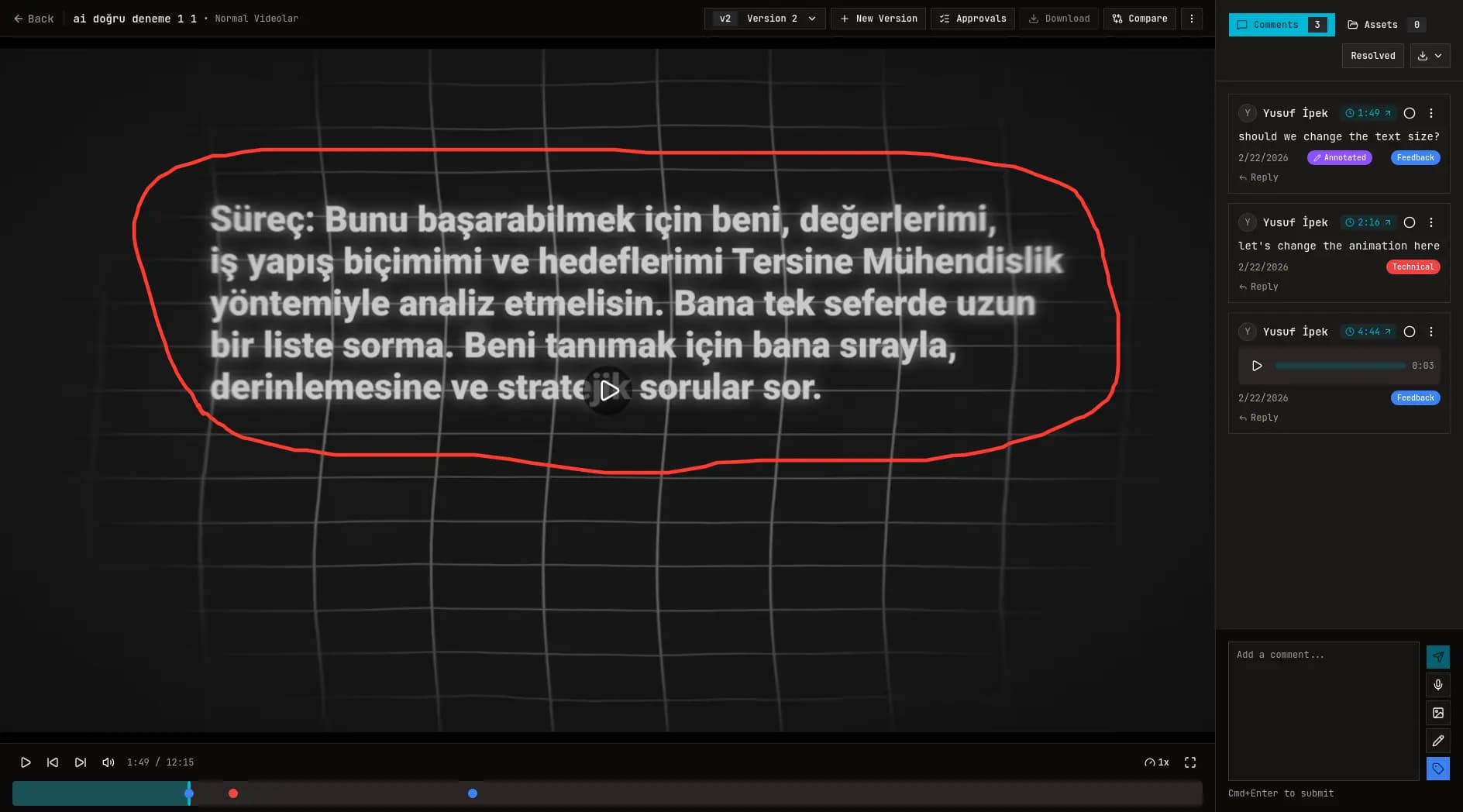
Feedback chaos looks like this:
- Comments spread across WhatsApp, email, and random screenshots.
- "Around 1:12" turns into 10 minutes of guessing.
- Nobody knows which version is actually the latest.
- One unclear note becomes a full extra revision round.
OpenFrame replaces all of that with one link, one timeline, one source of truth.
From upload to approval — in one flow.
Upload a cut
Share a review link
Get timestamped feedback
Mark approved and move on
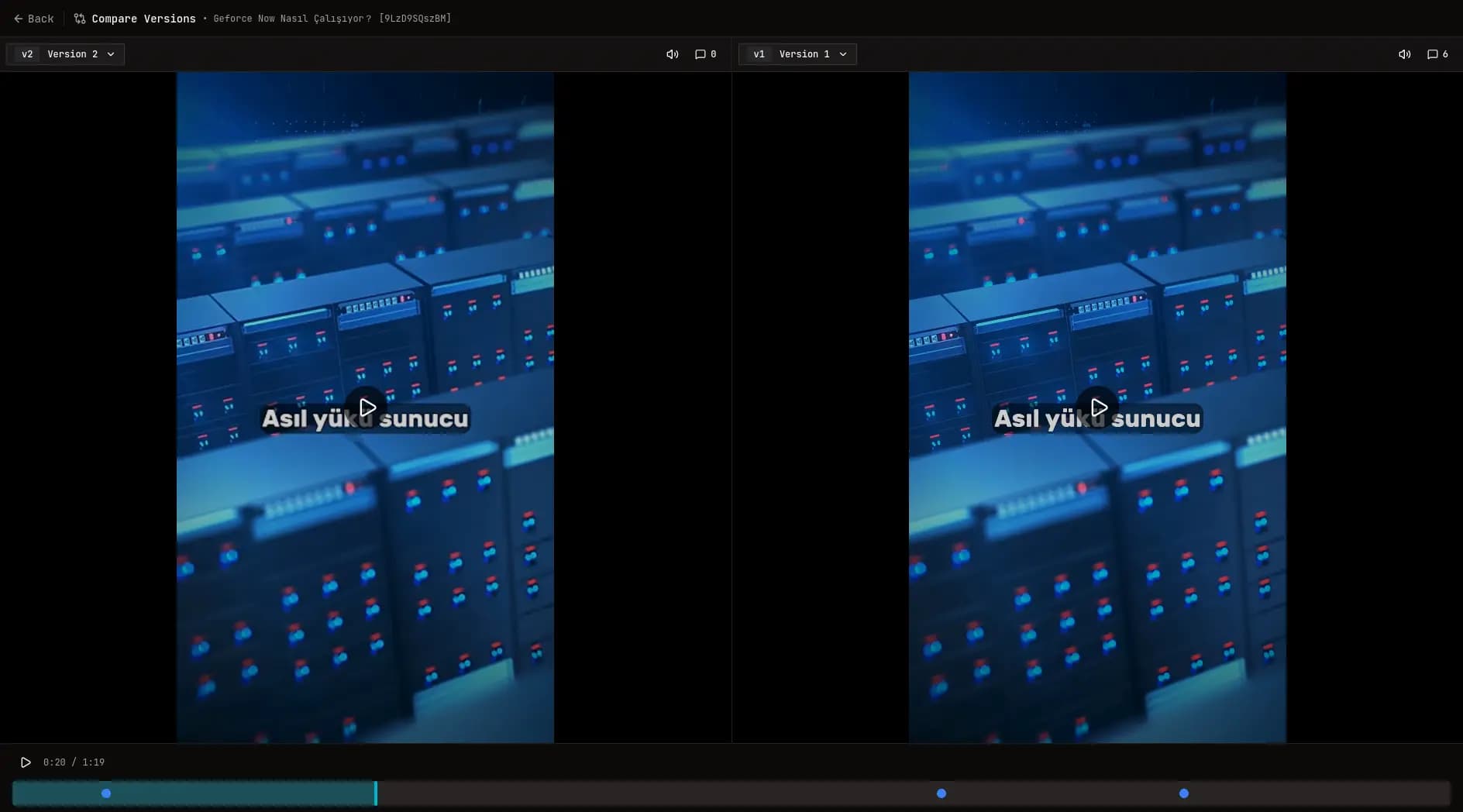
Compare versions side-by-side. End "which cut is this?"
See what actually changed between versions then approve with confidence.
Cuts revision cycles.
Explain it better with Voice.
No more "What did you mean by this?" emails. Every note lands at the exact moment in the video.
Faster feedback. Fewer misunderstandings.
Yusuf İpek
00:03:45

Point. Draw. Done.
Precise feedback that leaves zero room for error. Circle, sketch, and point directly on the video frame.
Stops "I thought you meant..."
Everything a real production workflow needs.
The core tools teams expect without the complexity that slows clients down.
Core workflow
Version Compare
Compare any two versions side-by-side on a single timeline.
Asset Management
Keep images and supplementary videos grouped perfectly per cut.
Version History
Infinite versioning. Toggle between V1 and V10 without losing where you are.
Approval Workflow
Assign specific team members or clients to review and sign off on a cut. Get an exact "Approved" status.
Workflow Accelerators
Keyboard Shortcuts
J, K, L, Space, and M controls for professional editing workflows.
PDF/CSV Exports
Turn video comments into a professional feedback report in one click.
Real-time Webhooks
Get instant Telegram alerts the second a comment is dropped. More integrations coming soon.
Mobile-Optimized Review
Touch-optimized player for clients reviewing cuts on the move.
Clients don't need an account. They just review.
If clients can't adopt the tool, approvals don't happen. OpenFrame keeps it frictionless.
One link. Review in the browser.
Works great on mobile.
Timestamped notes that are impossible to miss.
Let us run it for you - or deploy it yourself.
Zero setup. Flat pricing, no per-seat fees.
Hosted Cloud
Starts with a 7-day free trial. Cancel anytime.
- Unlimited collaborators
- Timestamped comments + voice notes
- Annotations + version compare
- Share links with permissions
- Exports (PDF/CSV)
- Unlimited YouTube Video Imports
- Download original uploaded video
- Includes: 200 GB Storage
Need more storage? Add 100 GB for $5/mo.
Start free trialFair Source (Self-hosted)
For teams who want full control and can run their own infrastructure. Licensed under the Functional Source License.
- Full source code — read it, audit it
- Self-host on your own infrastructure
- Every release becomes Apache 2.0 open source after two years
Need more than the standard limits?
Custom capacity and setup help for high-volume production teams. Tell us your storage, usage, and workflow - we'll recommend the right approach.
Contact usSecurity & privacy, by design.
- - Permissioned share links (control who can view/comment)
- - Private-by-default projects
- - Delete videos and projects anytime
- - Self-host option for full data control
FAQ
Do clients need an account?
No. They can review in the browser with a share link.
What happens if I exceed my storage?
You can add 100 GB for $5/mo. If you need much more, contact us at [email protected] and we'll help you choose the best setup.
How is YouTube unlimited?
There is no storage limit on YouTube imports. You can import an unlimited amount of unlisted YouTube videos and use all of our review features exactly the same.
Can I self-host?
Yes. The full source code is public and ships with a Docker setup for self-hosting. Hosted Cloud is for teams who want zero setup.
Is OpenFrame open source?
OpenFrame is Fair Source, licensed under the Functional Source License (FSL). You can read and audit the full source code and self-host it, and every release automatically becomes Apache 2.0 open source two years after publication.
Is there a free trial?
Yes. Hosted Cloud starts with a 7-day free trial. After that it is a flat $10/mo — no per-seat or per-client fees.
How is this different from sending a Google Drive link?
Drive doesn’t give timestamped discussion, voice notes, annotations, or version compare, which is where approval time is actually saved.
Is it mobile-friendly?
Yes. Clients can review and comment from mobile.
Can I export feedback?
Yes. Export to PDF/CSV for archiving or client handoff.
Who can access my videos?
Only people you invite or share a link with (based on permissions you set).
Can I cancel anytime?
Yes. Cancel anytime from your billing settings.
Stop chasing feedback. Start getting approvals.
Your first review link takes minutes.